
Company Website Headshots: A Practical Style Guide

Introduction
Company headshots on your website do one job well when they match: they make your team look like a real, credible group of people readers can trust. When crops, backgrounds, and lighting vary from person to person, your About or Team page looks stitched together, and visitors notice before they read a word of copy. If you run marketing, operations, or a founding team refreshing a staff page, this guide gives you the exact style rules to follow.
We cover the specifics that decide whether website headshots look intentional: cover crop, background choice, attire guidance, image dimensions, file naming, and how often to refresh. This is not generic portrait advice. It is a checklist built for company sites, where consistency across ten or a hundred faces matters more than any single striking photo.
Key Takeaways
- Consistency beats perfection. A uniform crop, background, and lighting across every employee headshot reads as more professional than a few flashy, mismatched shots.
- Lock a style spec first. Define crop ratio, background, framing, and export dimensions before anyone submits a photo, so the whole team follows one standard.
- File naming and dimensions are part of the design. Predictable filenames and correctly sized images keep your team page fast, tidy, and easy to update.
- Plan a refresh cadence. Set a recurring update rhythm so new hires and role changes never leave your staff page half-outdated.
Company Website Headshot Requirements
Website headshots have requirements that individual profile photos do not. On a personal LinkedIn page, one polished photo stands alone. On a company team page, every photo sits in a grid next to its neighbors, so the eye compares them instantly. That comparison is where inconsistency shows.
Three technical requirements matter most for company headshots:
- Uniform crop and framing: Every face should sit at roughly the same size and position within the frame. A common target is head-and-shoulders framing with the eyes on the upper third and even headroom.
- Matching background and lighting: Backgrounds should share the same color or texture, and lighting direction should be consistent. Mixed warm and cool tones across a grid look accidental.
- Correct export dimensions: Team grids usually display square or slightly portrait thumbnails. Exporting oversized images and letting the browser downscale them slows the page and can distort sharpness.
Page speed is a practical constraint here, not a nice-to-have. Google's own guidance treats page experience and Core Web Vitals as ranking-relevant signals, and large unoptimized images are a frequent cause of slow loads. Sizing headshots correctly protects both design and SEO (Google Search Central).
The goal is a page where a visitor scans twenty faces and feels one cohesive brand, not twenty separate photo sessions. If your team is distributed, keeping that consistency takes deliberate planning, which we cover in our guide to remote team headshots.
AI Headshot Strategy for Company Websites
The hardest part of company headshots is logistics. Scheduling a photographer for a distributed team, chasing reschedules, and re-shooting new hires one at a time is slow and expensive. This is where AI headshots change the workflow: each person uploads a handful of everyday photos, and a consistent style spec is applied across the whole team without coordinating a single shoot day.
To keep a company grid cohesive with AI, standardize the brief before anyone generates images. Decide on one background, one lighting direction, one crop, and one attire tier, then apply that same specification to every employee. Because the style is defined as instructions rather than lighting equipment in a room, matching twenty people is far easier than coordinating twenty separate photographers. You can compare finished examples and formats built for teams on our corporate headshots page.
A practical company AI workflow looks like this:
- Write the style spec once. Background color, framing, attire tier, and export dimensions, documented in a shared doc.
- Collect source photos to a standard. Ask each person for 5-20 clear, well-lit photos from different angles, with no heavy filters or sunglasses.
- Generate against the same brief. Apply identical background and framing settings for every team member.
- Review as a grid, not as singles. Place all outputs side by side and cut any photo that breaks the pattern.
- Export at the target dimensions. Crop and size to your team-page thumbnail spec before uploading.
One caution: AI outputs still need a human quality pass. Check for natural skin, correct eyewear, and realistic hands or collars. If a result looks off, regenerate rather than publish it. For a deeper look at how the underlying process works and where quality checks matter, see our explainer on how AI headshots work.
Create Professional Headshots in Minutes
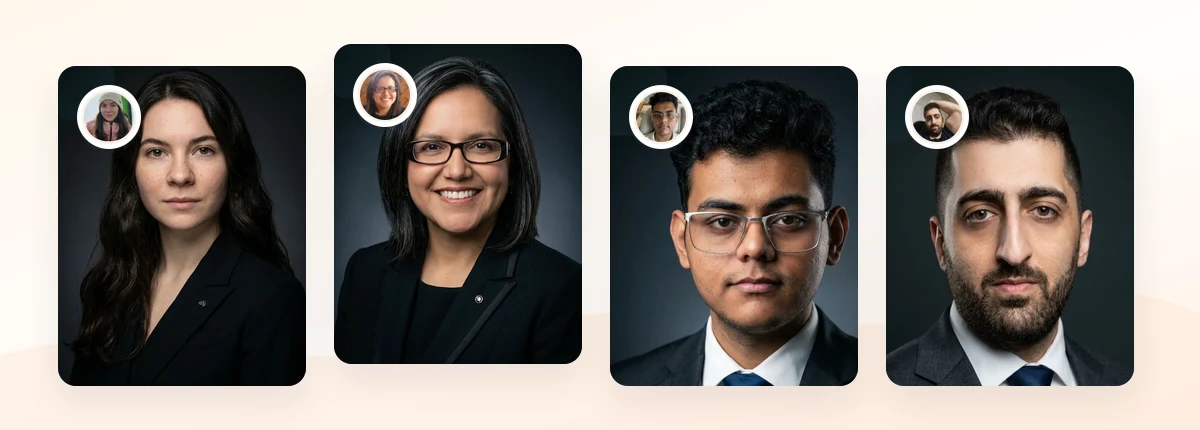
Upload 5-20 everyday photos and get 40-100 polished AI headshots for LinkedIn, resumes, company pages, and executive bios.
15-30 minute delivery • Full commercial rights • One-time payment
Get My Headshots →What Works for Company Website Headshots

Certain choices consistently make team pages look intentional. Use these as your default settings.
Crop: Head-and-shoulders framing is the safe standard for company grids. Keep the top of the head near the frame edge with a small margin, center the face horizontally, and place the eyes roughly one-third from the top. A square (1:1) crop works for most team-page thumbnail layouts.
Background: A clean, neutral background keeps focus on faces and unifies the grid. Solid light gray, soft white, or a subtly blurred office tone all work. Pick one and use it for everyone. For a fuller comparison of options and when each suits a brand, see our guide to headshot backgrounds.
Attire: Match attire to your brand and industry, then set a single tier for the whole team.
| Brand style | Recommended attire tier | Example |
|---|---|---|
| Corporate / finance / legal | Business formal | Blazers, collared shirts, muted colors |
| Tech / SaaS / agency | Smart casual | Clean shirts, simple knits, solid tones |
| Creative / lifestyle | Relaxed professional | Neat casual with a consistent color palette |
Expression: A natural, approachable expression photographs best for company sites. A relaxed closed-mouth smile or a light open smile reads as confident and friendly. What matters more than any single pose is keeping the expression tone warm across the whole team.
What to Avoid for Company Website Headshots
Most team-page problems come from a handful of avoidable mistakes. Watch for these before you publish.
- Mixed backgrounds. One person against white, another against a bookshelf, a third outdoors. Nothing breaks a grid faster than inconsistent backgrounds.
- Different crops and head sizes. If faces sit at wildly different scales, the row looks uneven even when every photo is technically good.
- Cropped-from-group photos. Zooming into a group shot to isolate one face produces soft, low-resolution results that look worse next to purpose-made headshots.
- Heavy filters or aggressive retouching. Over-smoothed skin and unnatural color make headshots look artificial and erode trust.
- Wrong dimensions and oversized files. Uploading full-resolution images that the browser downscales slows the page and can look blurry in small thumbnails.
- Selfies and casual snapshots. Phone-arm distortion and mixed lighting stand out immediately in a professional grid.
- Outdated photos. A headshot from three roles ago undercuts credibility when a visitor meets the person on a call.
If your team is fully remote, these mismatches multiply because everyone shoots in a different room. A shared style spec, plus AI generation against one brief, is the most reliable fix, which is exactly why distributed teams increasingly favor it over ad-hoc self-shot photos.
Step-by-Step: Optimizing Your Company Website Headshots

Use this sequence to take a team page from mismatched to cohesive.
- Write the style spec. Document crop ratio (for example 1:1), background (for example soft light gray), framing (head-and-shoulders), attire tier, and export dimensions. Share it with the whole team.
- Set export dimensions. Match your team-page thumbnail. A common target is 600x600px to 800x800px for square grids, exported as optimized WebP or JPG to keep files small.
- Standardize file naming. Use a predictable pattern so uploads and future swaps stay tidy. For example:
firstname-lastname-headshot.webp(all lowercase, hyphenated, no spaces). Consistent naming also helps developers automate the grid. - Collect or generate images to the spec. Whether shooting or using AI, apply the same background, framing, and attire tier to every person.
- Review as a grid. Assemble every headshot in the exact layout the site uses. Cut and redo anything that breaks the pattern.
- Compress before upload. Aim for small file sizes without visible quality loss, since image weight directly affects load time and page experience (web.dev).
- Write descriptive alt text. Use a clear pattern such as "Jane Doe, Head of Marketing, company headshot" for accessibility and SEO.
- Set a refresh cadence. Decide how often you update. A practical rhythm is a full team refresh annually, plus new-hire headshots added within their first month.
A documented spec is what makes the page maintainable. When a new hire joins or someone changes roles, you already know the crop, background, dimensions, and filename pattern, so updating one photo takes minutes instead of restarting the whole page.
Create Professional Headshots in Minutes
Upload 5-20 everyday photos and get 40-100 polished AI headshots for LinkedIn, resumes, company pages, and executive bios.
15-30 minute delivery • Full commercial rights • One-time payment
Get My Headshots →Final Thoughts
Great company headshots are less about any one striking photo and more about disciplined consistency across the whole team. When you lock a style spec for crop, background, attire, dimensions, file naming, and refresh cadence, your website headshots read as one credible brand instead of a patchwork of separate sessions. That cohesion builds trust with visitors before they read a single line of copy.
Start by writing your style spec and setting export dimensions, then collect or generate employee headshots against that single standard. Review everything as a grid, compress before upload, and schedule a recurring refresh so the page never drifts out of date. When you are ready to produce a matched set without coordinating a shoot day, the CTA above walks you through generating professional company headshots in minutes.
FAQ
What size should company website headshots be?
For most square team grids, export between 600x600px and 800x800px as optimized WebP or JPG. Match your site's actual thumbnail dimensions and compress files so the page loads fast without visible quality loss.
Should all employee headshots have the same background?
Yes. A single, consistent background is the fastest way to make a team page look cohesive. Pick one neutral tone, such as soft gray or white, and apply it to every headshot in the grid.
How should we name company headshot image files?
Use a predictable, lowercase, hyphenated pattern like firstname-lastname-headshot.webp. Consistent naming keeps uploads organized, makes future swaps easy, and helps developers automate the team page.
How often should we refresh company headshots?
A practical cadence is a full team refresh once a year, with new-hire headshots added within their first month. This keeps the staff page current without a large ongoing burden.
Can we use AI headshots for a company website?
Yes. AI headshots let a whole team match one style spec without scheduling a shoot, which is especially useful for remote teams. Apply the same background, crop, and attire tier to everyone, and run a human quality check before publishing.